A <1 MB screenshot tool with everything you need
A single 954 KB executable: region capture, pin-to-screen, vector annotation and on-screen OCR — tray resident with global hotkeys. Copy and run. No install, no admin.
Why sniper
Completely free
No ads, no trials, no account, and nothing is uploaded.
Lighter on memory
Hand-written Win32 — no Electron/.NET runtime, idles at a few MB.
Single file, portable
One 954 KB exe runs anywhere; nothing written to system folders.
Feature-rich
Capture, pin, annotate and OCR — four things you actually use daily.
Windows 10 / 11
Windows 10 1903+ and Windows 11, x64, standard user rights.
Four everyday needs, one exe
We deliberately skip scrolling capture, screen recording, cloud sync and image hosting — they all need extra dependencies or always-on services, which breaks the single-file promise.
One-key region capture
Press F1 for a full-screen overlay; hover snaps to windows, a magnifier reads colors, arrows nudge by the pixel.
Pin to screen
A borderless always-on-top window: drag, wheel-zoom, stays off the taskbar — pin reference images anywhere.
Vector annotation
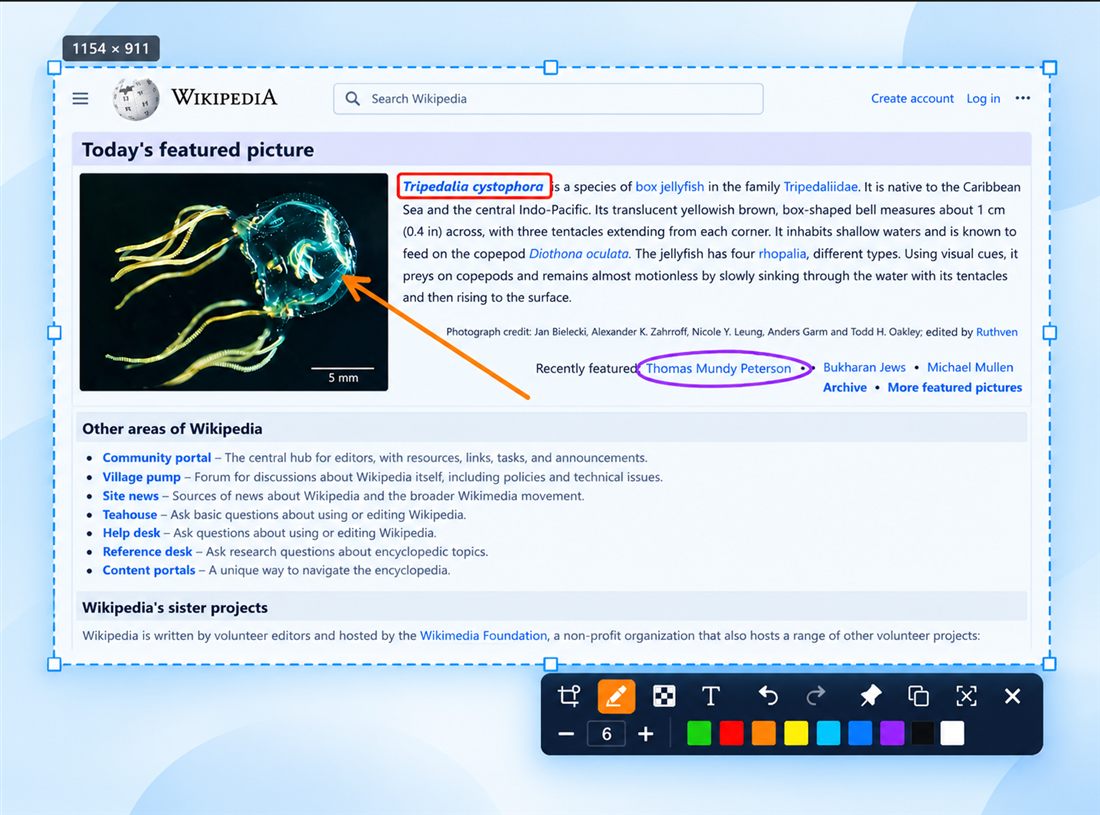
Rectangle, ellipse, pen, arrow, mosaic and text — with undo/redo, a palette and size controls.
On-screen OCR
Uses the built-in OCR engine; results open in a window where you select and copy any text, in Chinese or English.
Tray resident, unobtrusive
Tray icon, global hotkeys and autostart — and it exits cleanly with nothing left behind.
Fast and tiny
A 954 KB binary with no console window; cold start, capture and pin are near-instant.
Supported systems
- Windows 10 1903+ / Windows 11, x64
- Standard user rights — no administrator needed
- Writes only to %LOCALAPPDATA%\sniper\ and one HKCU autostart value
- OCR uses the built-in engine; the target language pack must be installed
Download sniper
Portable single file — copy it and run. Latest release below, with version, size and SHA-256.
Download .exe ·Size: 954 KB · Windows x64